Yahboom Pi5 Robot: Understanding Its Computing Layers
Mapping the controller, on-board computer, sensors, and backend components of a real robotic platform
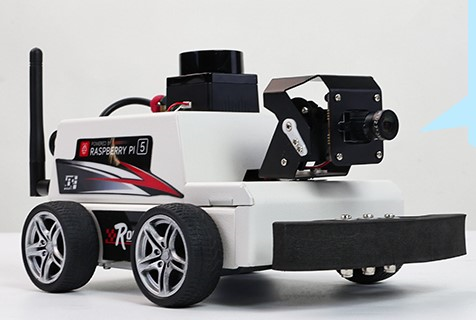
1. Objective
The previous article introduced the three main layers of a robotic system: the Controller Layer, the On-Board Computing Layer, and the Backend Layer.
▶ Robotic Systems: Understanding the Three Computing Layers
In this article, we will use the Yahboom Pi 5 robot as a practical example to understand how these layers appear in a real robotic platform.
The goal is to identify which parts of the robot belong to each layer and what role each layer plays.
The idea is simple: understand the three layers through a real robot.
2. Yahboom Pi 5 Robot Overview
The Yahboom Pi 5 robot brings together the different components required to build a complete robotic system.
At a high level, these components can be viewed through the same three layers introduced in the previous article:
- Controller Layer: responsible for low-level interaction with the robot hardware.
- On-Board Computing Layer: responsible for computation and higher-level robot functions.
- Backend Layer: responsible for communication and interaction with systems outside the robot.
A simplified view of the first two layers is:
                    Yahboom Pi 5 Robot
                           │
             ┌─────────────┴─────────────┐
             │                           │
             ▼                           ▼
     Controller Layer            On-Board Computing Layer
             │                           │
     ┌─────────────────┐         ┌─────────────────┐
     │    ESP32-S3     │         │  Raspberry Pi 5 │
     │                 │         │                 │
     │ • Motor Control │         │ • Linux / OS    │
     │ • Encoders      │◄───────►│ • ROS / ROS 2   │
     │ • Servo Control │ MicroROS│ • Vision / AI   │
     │ • IMU           │         │ • Navigation    │
     │ • Low-level I/O │         │ • Networking    │
     └─────────────────┘         └─────────────────┘
             │                           │
             ▼                           ▼
       Motors / Sensors             Cameras / LiDAR
The ESP32-S3 handles the low-level interaction with the robot hardware, while the Raspberry Pi 5 provides the computing environment for higher-level robotics software.
The next sections look at each layer in the context of the Yahboom Pi 5 robot.
3. Controller Layer
The Controller Layer in the Yahboom Pi 5 robot is based on an ESP32-S3 located on the MicroROS control board.
The ESP32-S3 is responsible for the lower-level control of the robot. Its main functions include:
- Motor control and encoder feedback
- Servo control
- IMU data acquisition
- Low-level sensor interfacing
- Communication with the Raspberry Pi5 through MicroROS
The controller board provides a 4-channel encoder motor driver, 2-channel PWM servo driver, 6-axis IMU, and interfaces for devices such as LiDAR.
The ESP32-S3 therefore handles the real-time interaction with the robot hardware, while the Raspberry Pi 5 performs the higher-level computation.
The ESP32-S3 is the controller; the Raspberry Pi 5 is the on-board computing platform.
4. On-Board Computing Layer
The On-Board Computing Layer of the Yahboom Pi 5 robot is built around the Raspberry Pi5.
The Raspberry Pi5 provides the main computing environment for the robot. It runs the operating system and the higher-level software required for robot applications.
Its main roles include:
- Running the Linux operating system.
- Running ROS / ROS 2 and other robotics software.
- Processing data from cameras and other higher-level sensors.
- Running vision, AI, SLAM, and navigation applications.
- Communicating with the ESP32-S3 controller through MicroROS.
- Providing Wi-Fi and Ethernet network connectivity for communication with external systems.
The Raspberry Pi 5 therefore sits above the controller layer. It makes higher-level decisions and sends commands to the ESP32-S3, which handles the low-level interaction with the robot hardware.
The Raspberry Pi 5 is the computing layer of the Yahboom robot, while the ESP32-S3 handles the low-level control.
5. Backend Layer
The Backend Layer exists outside the Yahboom Pi 5 robot. It provides the connection between the robot and external systems.
In this setup, the backend can be viewed as the system that communicates with the Raspberry Pi 5 through the network.
Typical functions include:
- Remote communication with the robot.
- Sending commands to the robot.
- Receiving robot status and data.
- Providing a user interface for interacting with the robot.
- Storing or processing robot data.
The Raspberry Pi 5 acts as the connection point between the robot's on-board computing environment and these external systems.
        Backend / External System
                  │
             Network / Wi-Fi
                  │
                  ▼
           Raspberry Pi 5
                  │
               MicroROS
                  │
                  ▼
              ESP32-S3
                  │
                  ▼
           Robot Hardware
The Backend Layer connects the robot to systems and users outside the robot itself.
6. How the Three Layers Connect
The three layers of the Yahboom Pi 5 robot work together as a single system.
The Backend Layer communicates with the robot through the network. The Raspberry Pi 5 performs the higher-level computation, while the ESP32-S3 handles the low-level control of the robot hardware.
        Backend / External System
                  │
             Network / Wi-Fi
                  │
                  ▼
          Raspberry Pi 5
       On-Board Computing Layer
                  │
               MicroROS
                  │
                  ▼
              ESP32-S3
           Controller Layer
                  │
                  ▼
          Motors / Sensors
For example, when a movement command is given, the Raspberry Pi 5 processes the command and communicates the required low-level commands to the ESP32-S3. The ESP32-S3 then interacts with the motors and sensors.
Feedback from the hardware follows the reverse path back to the Raspberry Pi 5 and, when required, to the backend system.
The three layers work together: the backend communicates with the robot, the Raspberry Pi 5 performs the main computation, and the ESP32-S3 controls the hardware.
7. Mapping the Yahboom Robot to the Three Layers
The Yahboom Pi 5 robot can now be mapped to the three-layer model introduced in the previous article.
                 Yahboom Pi 5 Robot
                         │
        ┌────────────────┼────────────────┐
        │                │                │
        ▼                ▼                ▼
   Controller      On-Board           Backend
      Layer         Computing           Layer
                     Layer
        │                │                │
    ESP32-S3        Raspberry Pi 5    External System
        │                │                │
    • Motors        • Linux          • Network
    • Encoders      • ROS / ROS 2    • Remote Control
    • IMU           • Vision         • User Interface
    • Servo         • SLAM           • Data / Services
    • Low-level I/O • Navigation
The important point is that the physical robot may contain components from more than one layer. The layers are defined by the role performed by each component, rather than simply by where the component is physically located.
In the Yahboom Pi 5 example:
- ESP32-S3: Controller Layer
- Raspberry Pi 5: On-Board Computing Layer
- External computer / services: Backend Layer
This mapping makes it easier to understand how the general robotic system model applies to a real robot.
8. Where Should We Focus?
The Yahboom Pi 5 robot contains components across different layers, but we do not need to study all layers in the same depth.
Our area of interest determines where we should focus:
- Robot Control: ESP32-S3, motors, encoders, sensors, and low-level control.
- Robotics Software: Raspberry Pi 5, Linux, ROS / ROS 2, perception, SLAM, and navigation.
- Backend / Robotics Systems: networking, communication, user interfaces, and external services.
A basic understanding of all three layers is still important because they work together as one robotic system.
Understand the complete robot, but go deeper into the layer that matches your area of work.
9. Takeaway
The Yahboom Pi 5 robot provides a practical example of the three-layer robotic system:
Controller Layer
└── ESP32-S3
    └── Motors, encoders, IMU, servo, low-level I/O

On-Board Computing Layer
└── Raspberry Pi 5
    └── Linux, ROS / ROS 2, vision, SLAM, navigation

Backend Layer
└── External Systems
    └── Network, remote control, user interface, data / services
Each layer has a different responsibility, but they work together to form the complete robotic system.
The controller controls the hardware, the Raspberry Pi 5 performs the main robot computation, and the backend connects the robot to the outside world.
Understanding this structure makes it easier to identify where a particular hardware component, software function, or robotics task belongs.
Relevant Link(s)
▶ Robotic Systems: Understanding the Three Computing Layers