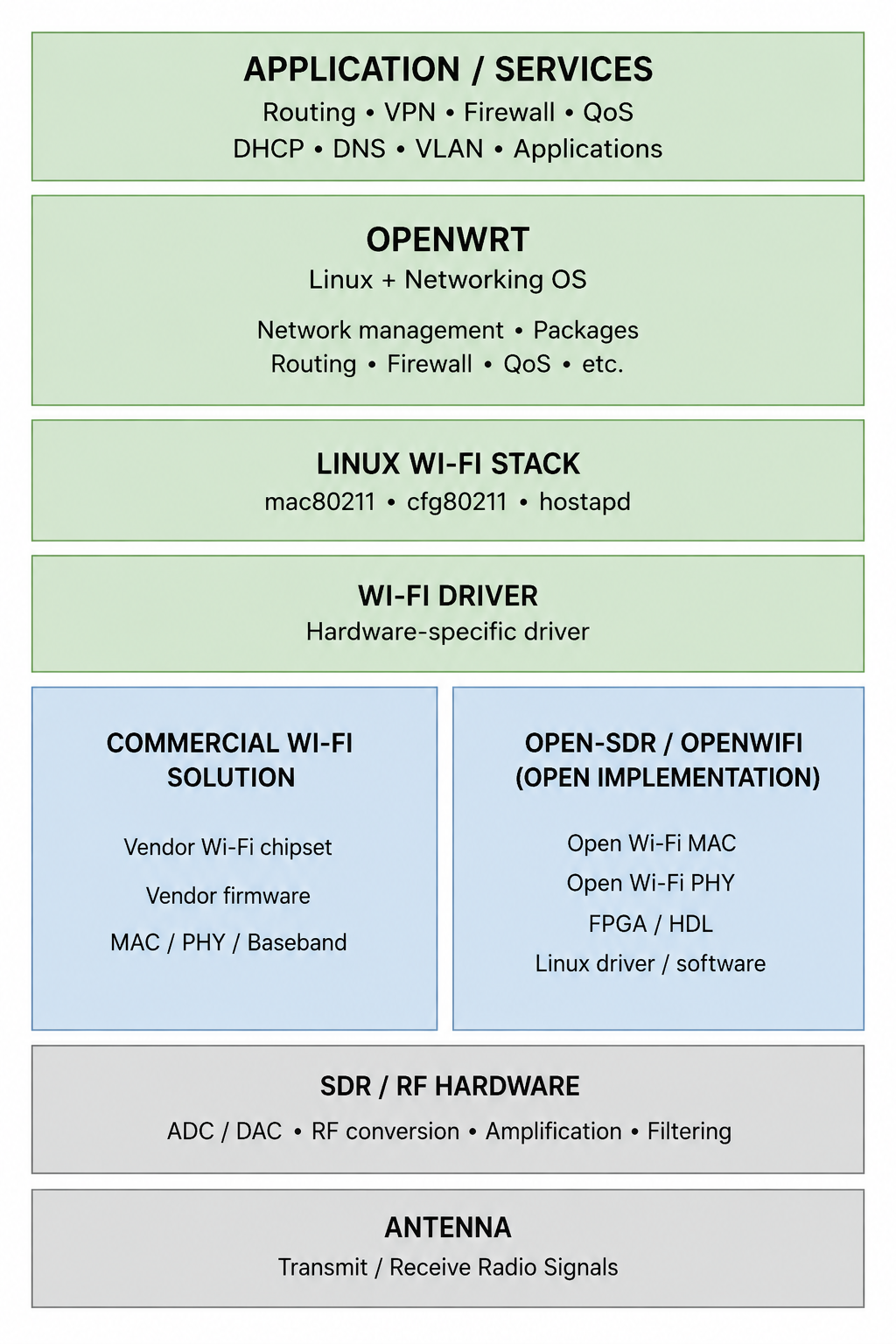
Open Wifi Part 1: Understanding OpenWrt, OpenWiFi, and Wireless Stack
A practical mental model of how an open Wi-Fi system is built, from the operating system and networking software to the Wi-Fi hardware and radio layer.
This article explains what OpenWrt provides, what it depends on, where OpenWiFi fits, and the different options available underneath OpenWrt.
1. The Big Picture: What Makes Up a Wi-Fi System
A Wi-Fi device is a combination of hardware, low-level radio software, Wi-Fi protocols, and higher-level networking software.
A useful mental model is:
Application / Network Services
            ↓
Operating System & Networking
       (e.g. OpenWrt/Linux)
            ↓
Wi-Fi Stack
    (e.g. mac80211, hostapd)
            ↓
Wi-Fi Driver
            ↓
Wi-Fi Chipset / MAC / PHY / Baseband
            ↓
RF Frontend
            ↓
Antenna
The Main Layers
- Operating system: Runs the networking software and provides the platform on which applications and network services run.
- Networking software: Handles IP networking, routing, firewalling, VLANs, DHCP, DNS, QoS, etc.
- Wi-Fi stack: Implements the higher-level 802.11 functionality needed to operate a Wi-Fi network.
- Wi-Fi driver: Connects the Linux/Wi-Fi software stack to the specific Wi-Fi hardware.
- Wi-Fi chipset: Handles Wi-Fi-specific processing, including MAC and PHY/baseband functions. Depending on the hardware, some of this may be implemented in dedicated hardware, firmware, or an FPGA.
- RF frontend: Converts digital radio signals into signals suitable for transmission/reception at the actual radio frequency.
- Antenna: Transmits and receives the electromagnetic signal.
2. OpenWrt: What It Is and What it is NOT
OpenWrt is an open-source Linux-based operating system for embedded networking devices, especially routers and access points.
It is best thought of as the software platform that runs the networking device.
What OpenWrt Provides
- Linux operating system
- IP networking
- Routing
- Firewall
- NAT
- DHCP / DNS
- VLANs
- QoS / traffic control
- VPN support
- Network interfaces and configuration
- Package management
- Web and command-line management
- Support for various Wi-Fi stacks and drivers
This makes OpenWrt much more than a simple Wi-Fi configuration system. We can use it to build a customized router, access point, mesh node, gateway, or other networking device.
OpenWrt gives us the open software platform for the networking device; the actual Wi-Fi implementation depends on the hardware and Wi-Fi driver underneath it.
What OpenWrt Does Not Provide
OpenWrt provides the operating system and networking environment, but it does not itself contain all the hardware needed to transmit Wi-Fi.
To turn an OpenWrt device into a Wi-Fi device, additional hardware and software are required:
- Wi-Fi chipset / radio
- PHY / baseband hardware
- RF frontend
- Antennas
- Hardware-specific Wi-Fi drivers
- Chipset firmware, when required by the hardware
- The physical implementation of the 802.11 PHY
These components normally come from the Wi-Fi hardware platform or its manufacturer.
The important point is that OpenWrt sits above the physical Wi-Fi implementation.
3. How OpenWrt Talks to Wi-Fi Hardware
OpenWrt does not directly control the Wi-Fi chipset. It uses the Linux wireless subsystem and a hardware-specific Wi-Fi driver to communicate with the chipset.
The simplified path is:
OpenWrt
   ↓
hostapd / wpa_supplicant / iw
   ↓
cfg80211 / nl80211
   ↓
mac80211
   ↓
Wi-Fi Driver
   ↓
Wi-Fi Chipset
The Main Components
- hostapd: Controls an access point, including association, authentication, and Wi-Fi security.
- wpa_supplicant: Handles Wi-Fi client/station functionality and authentication.
- iw: Command-line tool for configuring and inspecting Wi-Fi interfaces.
- cfg80211: Linux kernel subsystem used to configure wireless devices.
- nl80211: Netlink interface through which user-space programs communicate with the Linux wireless subsystem.
- mac80211: Common Linux 802.11 framework used by many Wi-Fi drivers.
- Wi-Fi driver: Hardware-specific code that communicates with a particular Wi-Fi chipset.
Why the Driver Matters
OpenWrt can support a Wi-Fi chipset only when there is a suitable Linux/OpenWrt driver for that hardware.
For example, different chipsets use different drivers:
- Qualcomm/Atheros:
ath9k,ath10k,ath11k, etc. - MediaTek:
mt76 - Other chipsets have their own drivers.
The driver is therefore the bridge between the generic Linux/OpenWrt networking software and the specific Wi-Fi hardware.
Why This Matters for Open Wi-Fi
This creates an important boundary:
Open-source
    │
    ├── OpenWrt
    ├── Linux wireless subsystem
    └── Open-source driver
             │
             ▼
      ┌─────────────────┐
      │ Wi-Fi chipset   │
      │ firmware / PHY  │
      │ baseband        │
      └─────────────────┘
             │
             ▼
        RF hardware
Even if everything above the chipset is open source, the chipset, firmware, or PHY/baseband can still be proprietary.
4. OpenWrt with Commercial / Vendor Wi-Fi
The most common way to use OpenWrt is with a commercial Wi-Fi chipset supplied by a hardware manufacturer.
However, we cannot take any Wi-Fi chipset and simply install OpenWrt on it. The hardware must be supported by OpenWrt/Linux, including having a compatible Wi-Fi driver and, where required, compatible firmware.
Hardware Compatibility
When choosing hardware for OpenWrt, we need to check:
- Is the device supported by OpenWrt?
- Is the Wi-Fi chipset supported?
- Is there a compatible Linux/OpenWrt driver?
- Does the driver support the Wi-Fi features we need?
- Is the required firmware available and compatible?
- Are the required bands, channels, MIMO features, etc. supported?
For example, a Wi-Fi chipset may technically work with Linux but still have limited OpenWrt support or missing features.
Therefore:
OpenWrt support is hardware-specific. We must choose a supported device/chipset rather than assuming that any Wi-Fi hardware will work.
What Is Under Our Control
With a supported commercial Wi-Fi platform, OpenWrt can be used to build:
- Wi-Fi access points
- Routers
- Mesh nodes
- Repeaters
- Gateways
- Customized networking devices
We can modify the networking behavior without modifying the Wi-Fi PHY itself.
For example, we can experiment with:
- Routing
- VLANs
- Firewalling
- QoS
- Traffic shaping
- Network management
- Mesh networking
What Remains Outside Our Control
With a typical commercial Wi-Fi chipset, some lower-level components may remain proprietary:
- Chipset hardware design
- Firmware
- PHY / baseband implementation
- Hardware-specific features
- Some driver components
Therefore, OpenWrt does not automatically make the entire Wi-Fi device open source.
The Practical Model
Think of the relationship as:
OpenWrt = open networking platform
Commercial Wi-Fi hardware = the supported wireless platform underneath it
Driver = the bridge between them
If our goal is to build a router, AP, mesh node, or specialized network device, this combination is usually sufficient.
If we want to modify the actual Wi-Fi PHY, MAC, or baseband implementation, we need to look beyond a conventional commercial Wi-Fi chipset. That is where projects such as open-sdr/openwifi become relevant (as described below).
5. open-sdr/openwifi: An Open Wi-Fi Implementation
open-sdr/openwifi is an open-source research platform that provides an implementation of Wi-Fi that can be modified at a much deeper level than a typical OpenWrt + commercial Wi-Fi chipset setup.
The key difference is that the project exposes parts of the actual Wi-Fi MAC and PHY implementation, including an FPGA-based implementation.
What It Provides
The project includes:
- Linux Wi-Fi driver and software
- Integration with the Linux
mac80211subsystem - FPGA-based Wi-Fi MAC/PHY implementation
- HDL/FPGA source code
- SDR-based RF hardware support
- Tools and software for configuring and experimenting with the system
A simplified view is:
Why the FPGA Matters
With a conventional Wi-Fi chipset, much of the low-level Wi-Fi implementation is inside the chipset and its firmware.
We normally interact with it through a driver:
With open-sdr/openwifi, the FPGA implementation is available as source:
This gives researchers the ability to inspect, modify, and experiment with the actual Wi-Fi implementation.
What It Is Useful For
open-sdr/openwifi is particularly useful when we want to research or modify:
- Wi-Fi PHY
- Wi-Fi MAC
- Timing and synchronization
- New wireless algorithms
- Experimental Wi-Fi features
- Wireless TSN
- Wi-Fi sensing
- Other low-level wireless techniques
The Trade-off
This flexibility comes with significantly more complexity.
Unlike installing OpenWrt on a supported commercial router, open-sdr/openwifi generally requires FPGA/SDR hardware and a deeper understanding of Linux, wireless networking, FPGA development, and digital communications.
Therefore:
OpenWrt + commercial Wi-Fi hardware: use Wi-Fi as an existing technology and focus on networking.
open-sdr/openwifi: use an open implementation of Wi-Fi itself and have the ability to modify the lower layers.
Important: openwifi Does Not Include the Complete RF Chain
open-sdr/openwifi provides the open digital Wi-Fi implementation, but it is not the complete radio hardware.
In particular, openwifi does not mean that the following are included as part of the openwifi implementation:
- RF frontend
- ADC / DAC hardware
- RF amplifiers
- Filters
- RF up/down converters
- Antenna
A useful mental model is:
open-sdr/openwifi
        │
        ├── Wi-Fi MAC
        ├── Wi-Fi PHY
        ├── FPGA / HDL
        └── Linux driver / software
        │
        ▼
Compatible SDR / RF Hardware
        │
        ├── ADC / DAC
        ├── RF conversion
        ├── Amplification
        └── Filtering
        │
        ▼
     Antenna
The SDR/RF hardware is therefore a separate hardware platform that openwifi uses.
This distinction is important:
openwifi gives us an open implementation of much of the digital Wi-Fi processing; we still need compatible RF hardware and an antenna to actually transmit and receive radio signals.
6. Other Wi-Fi Options Under OpenWrt
open-sdr/openwifi is not the only way to provide Wi-Fi on an OpenWrt device.
The most common approach is to use a commercial Wi-Fi chipset with a Linux/OpenWrt-supported driver.
Examples include platforms based on:
- Qualcomm / Atheros
- MediaTek
- Other chipsets supported by the Linux wireless subsystem and OpenWrt
The important point is not the manufacturer name alone. The specific chipset, device, driver, firmware, and OpenWrt version must be checked for compatibility.
Option 1: Commercial Wi-Fi Hardware
This is by far the most practical option when we want to build a networking system rather than develop Wi-Fi itself.
We get access to the networking functionality provided by OpenWrt while the chipset handles the low-level Wi-Fi implementation.
Option 2: open-sdr/openwifi
This is appropriate when we want to modify or research the Wi-Fi implementation itself.
Choosing Between Commercial vs. Openwifi
| Goal | Better option |
|---|---|
| Build a router or AP | Commercial Wi-Fi + OpenWrt |
| Build a mesh node | Commercial Wi-Fi + OpenWrt |
| Build a customized networking device | Commercial Wi-Fi + OpenWrt |
| Experiment with routing/QoS/firewalling | Commercial Wi-Fi + OpenWrt |
| Modify the Wi-Fi MAC/PHY | open-sdr/openwifi |
| Research new PHY algorithms | open-sdr/openwifi |
| Research Wi-Fi timing/TSN | open-sdr/openwifi |
| Experiment with Wi-Fi sensing | open-sdr/openwifi |
The Practical Rule
If Wi-Fi is just the connectivity layer for our project, use supported commercial Wi-Fi hardware.
If Wi-Fi itself is the research subject, consider open-sdr/openwifi.
This is the main decision to make when choosing what goes underneath OpenWrt.
7. Open vs Proprietary Layers
Using OpenWrt does not automatically mean that the entire Wi-Fi system is open source.
The different layers can have different levels of openness.
For example:
OpenWrt
   ↓
Linux Wi-Fi stack
   ↓
Open-source driver
   ↓
Commercial Wi-Fi chipset
   ↓
Proprietary firmware / PHY / hardware
   ↓
RF / Antenna
In this case, the upper software layers are open, but parts of the actual Wi-Fi implementation may remain proprietary.
A More Open System
With a project such as open-sdr/openwifi:
More of the implementation is available for inspection and modification.
What "Open" Can Mean
When evaluating a Wi-Fi platform, it is useful to ask which of these are open:
- Operating system
- Networking software
- Wi-Fi stack
- Wi-Fi driver
- Firmware
- MAC implementation
- PHY / baseband implementation
- FPGA / HDL design
- Hardware design
- RF hardware
A system can be open at one layer and closed at another.
8. Choosing the Right Platform
The right platform depends on what we are trying to build or research.
The most important decision is whether Wi-Fi itself is the subject of our work, or whether Wi-Fi is simply the connectivity layer.
If Wi-Fi Is Just Connectivity
Use:
This is the simplest and most practical approach.
We can focus on:
- Applications
- Routing
- Networking
- QoS
- Firewalling
- Mesh networking
- Network management
We do not need to understand or modify the Wi-Fi PHY or baseband.
If We Want to Modify Wi-Fi
Use:
This makes sense when our research involves:
- MAC/PHY modifications
- New Wi-Fi algorithms
- Wireless synchronization
- Experimental scheduling
- PHY-level sensing
- Wireless TSN
- Other low-level wireless research
A Simple Decision Table
| Goal | Recommended platform |
|---|---|
| Router / gateway | OpenWrt + commercial Wi-Fi |
| Access point | OpenWrt + commercial Wi-Fi |
| Mesh networking | OpenWrt + supported Wi-Fi hardware |
| Custom networking | OpenWrt + commercial Wi-Fi |
| Routing / QoS research | OpenWrt + commercial Wi-Fi |
| Wi-Fi MAC research | open-sdr/openwifi |
| Wi-Fi PHY research | open-sdr/openwifi |
| FPGA-based Wi-Fi research | open-sdr/openwifi |
| Wireless TSN research | open-sdr/openwifi |
| New Wi-Fi protocol experimentation | open-sdr/openwifi |
The Core Rule
Use OpenWrt when we want to build something with Wi-Fi.
Use open-sdr/openwifi when we want to build or modify Wi-Fi itself.
This distinction prevents unnecessary complexity. If our project is about drones, routing, distributed networking, or applications running over Wi-Fi, we generally do not need to build the Wi-Fi PHY ourselves.
9. Putting It All Together: The Complete Open Wi-Fi Stack
The easiest way to understand the relationship between OpenWrt and open Wi-Fi projects is to look at the complete stack.
Conventional OpenWrt Device
A typical OpenWrt-based router or access point looks like:
Applications / Network Services
            ↓
          OpenWrt
            ↓
 Linux Networking + Wi-Fi Stack
            ↓
       Wi-Fi Driver
            ↓
 Commercial Wi-Fi Chipset
            ↓
       PHY / Baseband
            ↓
        RF Frontend
            ↓
          Antenna
Here, OpenWrt provides the operating system and networking environment, while the commercial Wi-Fi hardware provides the lower-level wireless implementation.
OpenWrt + open-sdr/openwifi
A research-oriented system can instead look like:
Applications / Network Services
            ↓
       OpenWrt / Linux
            ↓
 Linux Networking + Wi-Fi Stack
            ↓
     openwifi Driver
            ↓
     FPGA MAC / PHY
            ↓
          SDR
            ↓
       RF Frontend
            ↓
          Antenna
Here, much more of the Wi-Fi implementation is open and modifiable.
The Mental Model
The important thing is to separate the roles:
| Component | Role |
|---|---|
| OpenWrt | Operating system + networking platform |
| Linux wireless stack | Common Wi-Fi software framework |
| Wi-Fi driver | Connects Linux to specific Wi-Fi hardware |
| Commercial Wi-Fi chipset | Provides the low-level Wi-Fi implementation |
| open-sdr/openwifi | Provides an open, modifiable Wi-Fi implementation |
| RF hardware | Converts between digital signals and radio frequency |
| Antenna | Transmits and receives the wireless signal |
The Big Picture
We can therefore think of the system as three broad layers:
┌─────────────────────────────────────┐
│       Applications / Networking     │
│                                     │
│  Routing • Firewall • QoS • VPN     │
│  Mesh • Network Services • etc.     │
├─────────────────────────────────────┤
│          OpenWrt / Linux            │
├─────────────────────────────────────┤
│           Wi-Fi Layer               │
│                                     │
│ Commercial chipset   OR  openwifi   │
├─────────────────────────────────────┤
│          RF + Antenna               │
└─────────────────────────────────────┘
The key takeaway is:
OpenWrt is an open networking platform, not the entire Wi-Fi system.
Commercial Wi-Fi hardware is the practical choice when Wi-Fi is simply a connectivity layer.
open-sdr/openwifi becomes valuable when we want to inspect, modify, and research the Wi-Fi implementation itself.
This distinction provides the foundation for understanding more advanced topics such as Wi-Fi mesh, MANETs, TSN, long-range wireless networking, and programmable wireless systems.